Export to EDRS
Let's examine how to export data from RigFlow and import it into the EDRS system. This process ensures that operational activities recorded in RigFlow are efficiently transferred to EDRS, minimizing the need for double reporting and reducing the risk of errors.
How it looks
In RigFlow, an EDRS report column has been added to the Operation Log, allowing users to select relevant Phase, Activity, Reason, and Planned Phase codes directly within the system. This setup is designed to streamline the process of exporting data for EDRS import, ensuring consistency and accuracy. Refer to the EDRS manual for definitions of Phase, Activity, Reason, and Planned Phase codes.
Step-by-step instructions
Export EDRS file from RigFlow
Open the Export panel: Go to the Right sidebar and navigate to
 Export.
Select EDRS Export: Under Export type picker, select EDRS Export.
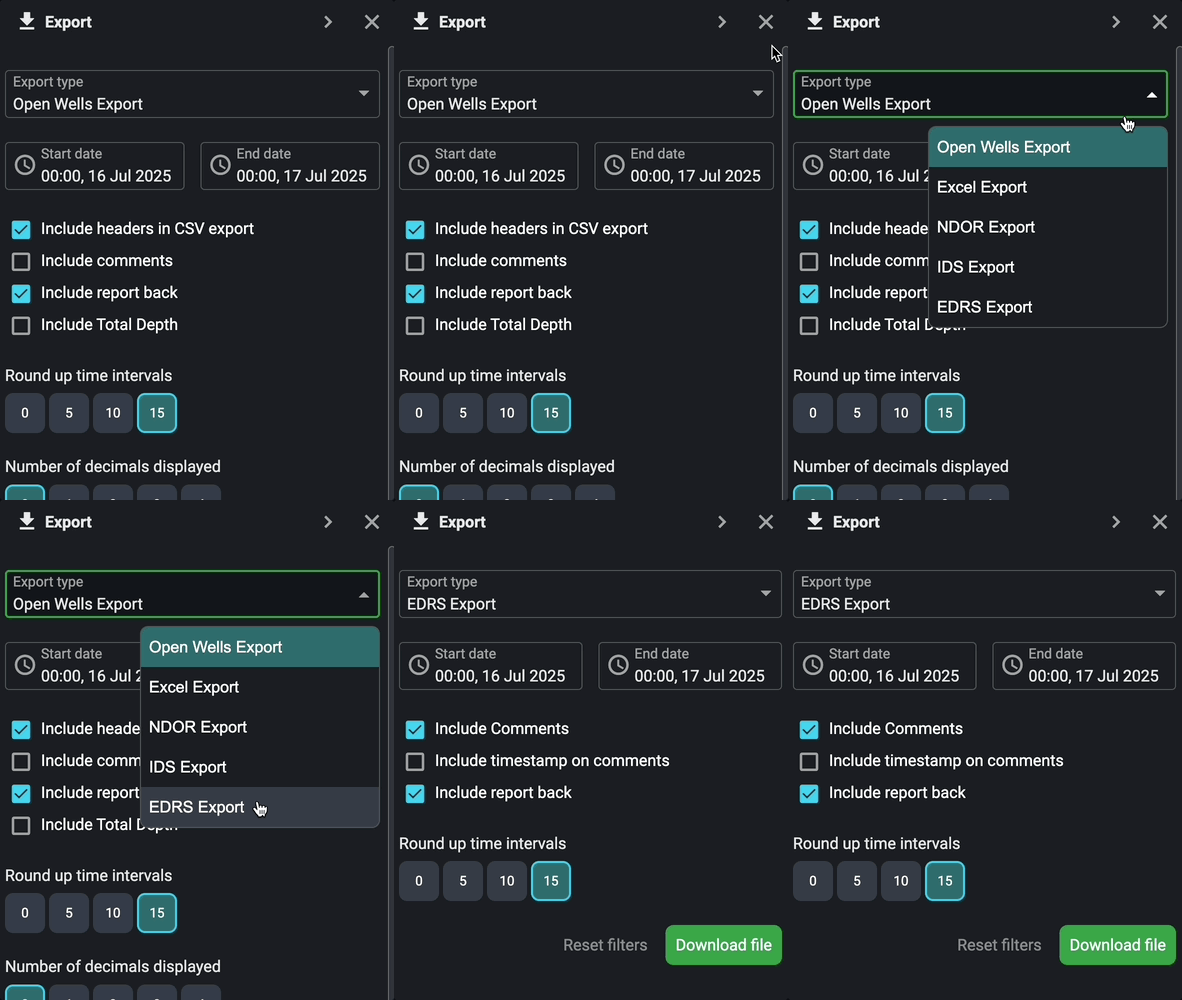
Adjust the start and end dates: Use the date picker to specify the export's desired date and time range.
Configure the export settings:
Decide whether to include comments (included by default).
Decide whether to include a timestamp on comments.
Decide whether to include report back. Report back are included by default.
Set the rounding for start and end times (default is 15 minutes).
Download file: When ready, click Download file. A JSON file will be downloaded to your downloads folder. This is the file for importing into EDRS.
Note
The number of decimals on depth is two decimal places for Start Depth and End Depth, and zero decimal places for Total Depth.
Import the file into EDRS
Import the JSON file: Email the JSON file you exported from RigFlow to edrslogs@kcadeutag.com, and it will be automatically imported into EDRS.
Modify mandatory information: In EDRS, navigate to the Logs module and modify any mandatory information that wasn't transferred during the export.
Make any final adjustments: Such as rewording step titles or removing unnecessary comments.
Submit the entries: Update the log to submit the entries.
Note
It is recommended to export/import once every 24 hours; however, the import process can be repeated multiple times throughout the day, allowing different users (e.g., Day and Night driller) to import RigFlow entries for their respective shifts.
Tips and tricks
Be mindful of the rounding settings in RigFlow. If multiple steps have durations shorter than the rounding interval, the start and end times may be the same, leading to zero-minute durations.
Adjusting Times: If the exported times need to be fine-tuned, this can be done in EDRS.
Rewording Titles: Step titles may need to be modified to match the format required by EDRS, and unnecessary comments may need to be deleted. This can be done in EDRS.