WellNav
WellNav is a real-time geological data visualization tool that functions as a digital "trip risk log" for Geology and Rig Teams. It is an application within RigFlow which displays geological risks, events, lithology, formations, and surveys from a geology database combined with string position so that the Rig Team has easy access to crucial "trip risk" information.
WellNav is intended for use by Geology and Rig Teams. It offers an application that synchronizes geological data in real-time, enabling informed decision-making and enhancing operational safety.
Key Features
Real-time data synchronization of the geology database: Ensures the latest geological data is always available.
Visual cues and notifications: Alert users to important entries, enhancing safety and decision-making.
Filtering and Customization: Use filters to focus on relevant information and reduce clutter.
Role-based permissions: Provides appropriate access and editing rights within WellNav.
Mobile accessibility: Ensures access to information from any device.
PDF export capabilities: Enables easy sharing with individuals outside the WellNav system.
Overview WellNav
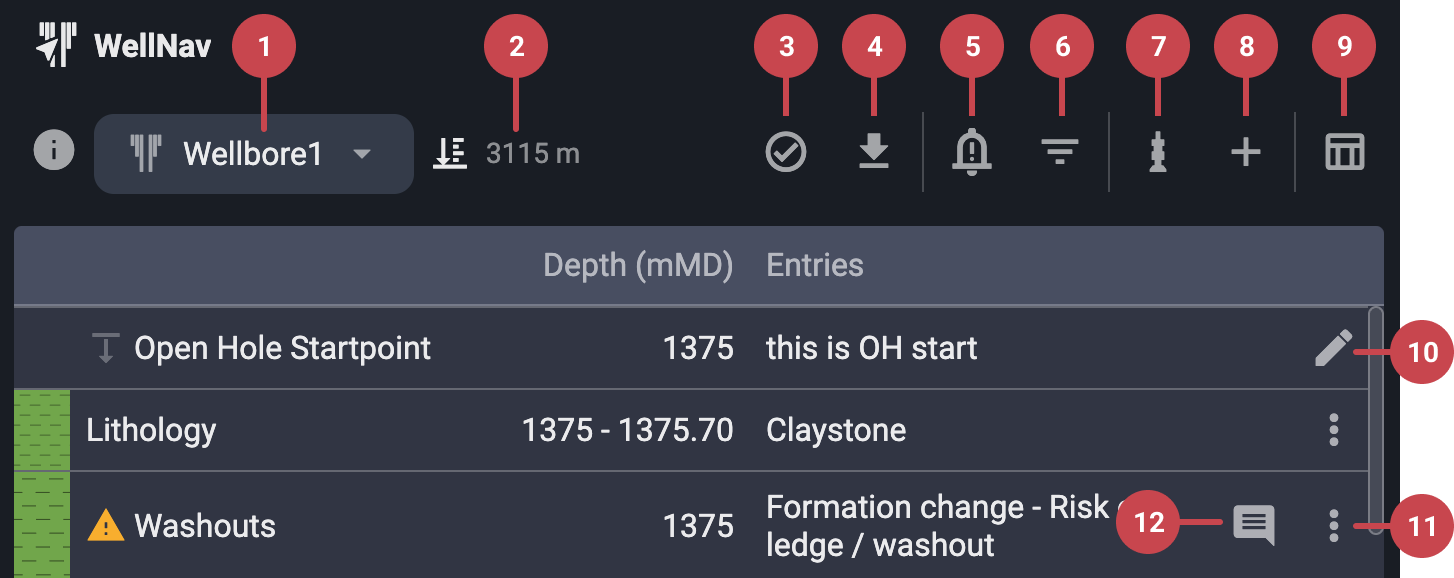
Current Bit Depth: Displays the current bit depth as reported by the drilling control system.
Wellbore selection: Expanding this menu reveals available wells and wellbores sourced from the geology database. The currently active well is highlighted.. For more information, refer to Select wellbore & navigate to active well.
Teams verifications: Click to view team verifications for different wells and plans. These serve as visual confirmations within RigFlow that WellNav is properly configured for the current plan and well. For more information, refer to Team verifications.
PDF downloads: Download a PDF of the information shown in the WellNav table view. Apply filters beforehand to customize the export.
Notification settings: Open this menu to adjust the notification set point. For more information, refer to Notifications in WellNav.
Filters: Toggle visibility of specific data in both the table and well views, including Geology Team entries, RigFlow entries, Surveys, and Lithology.
String Points of Interest (POI): Add or update string Points of Interest (POI) to a plan, or copy POIs from one plan to another. For more information, refer to How to use Points of Interest (POI).
Add entry: Insert a new RigFlow entry into the well by selecting from a predefined list. For more information, refer to How to use entries.
Toggle view: Switch between well view and table view at any time.
Open hole start point (edit): Click the
 edit icon, change the open hole start point, and optionally include a description.
Entry (more option): Use the
 more icon next to an entry to edit it or add a comment.
Comments: View all comments, including timestamps and job roles. You may edit or delete your own comments.