Create, edit or delete historical actions and steps
RigFlow allows you to change saved information in the "live plan" and "operation log."
The rig team can set a specific time window for editing. After completing a step, you’ll have this designated period to make any adjustments. Once the time window expires, editing will no longer be possible (standard time is 24 hours).
Keep in mind that some changes affect other parts. For instance, if you update the start time of a step, it will also adjust the finish time of the preceding step.
Create a Historical Action
Sometimes, you may need to insert an action between two steps or split a step with an action that was not part of the original plan from the planning system. Here's how to do it:
Open the Operation Log.
Click on
 Add Historical Action.
Choose one of the blue borders shown in the log view to insert the historical action at the desired point.
Select the category for the historical action.
The action is now added.
Edit actions and steps
You can change the step and action in the operation log by clicking any step or action in the log.
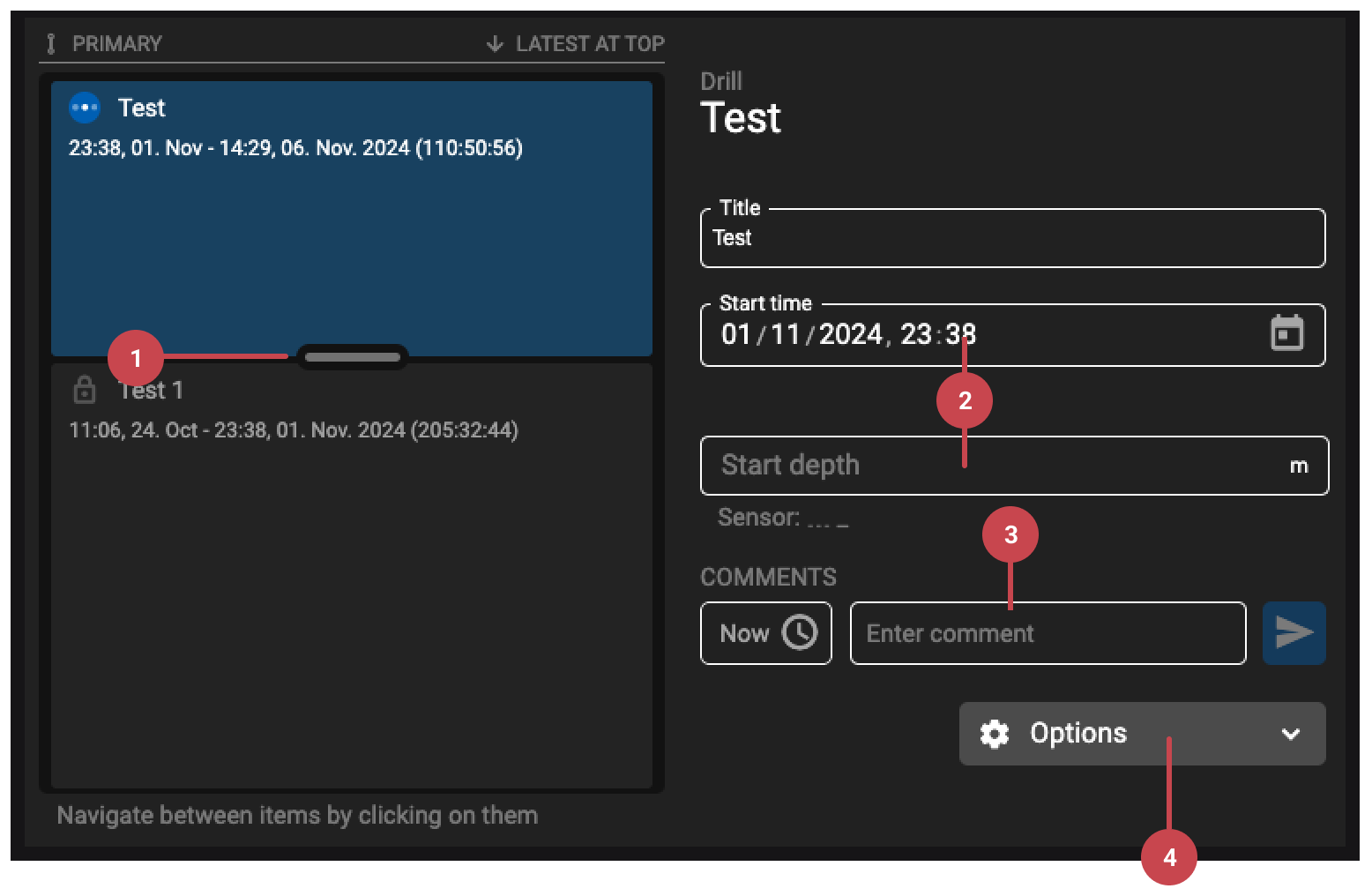
Change the Start/Stop Time: Use the slider to move the time up or down. A dotted line will show the original time, so you can go back if needed. Changing the time here will also change the operation time next to it.
Edit Time or Depth: Click on the boxes with the time or depth to change them.
Add or Edit Comments: In the comments section, you can add a new comment, delete a comment, or change existing comments.
Options may include the ability to:
Delete an existing action or step and return to the previous one.
Delete a part of a step (if it has been split).
Display a step or action in the Plan.
Tip
Actions, added by the rig team, offer more editing options than steps, providing you with greater flexibility to customize them for your immediate needs. To edit an action, simply click on it in the log and follow the same steps as previously mentioned. For more details about the difference between actions vs. steps, refer to What is the difference between actions and steps?.