RigFlow version 2.10
December 2025
This document covers the release of software updates for RigFlow. This release primarily introduces major features. The new features are outlined in the detailed release notes section.
General features
These features are available by default to all users of this version of RigFlow as part of this release.
Sensor snapshot
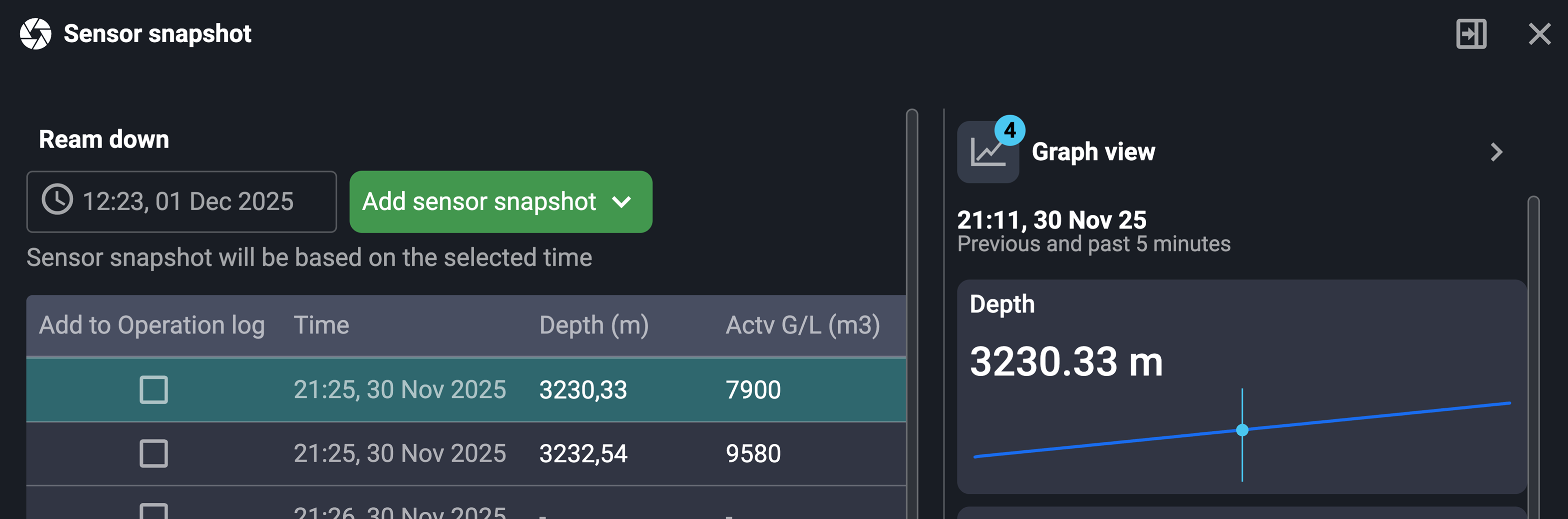
The Sensor snapshot feature allows users to capture and store sensor values at specific moments without cluttering the comment field. Snapshots can be added from any step or by typing # in a comment. They are saved in a table for easier review, editing (if the step is unlocked), and optional inclusion in the Operation Log. Each snapshot also includes a graph showing sensor trends 5 minutes before and after the capture. The modal can be docked for continuous monitoring while working.
Read more about it on Sensor Snapshot.
Checkbox for text and tables in instructions
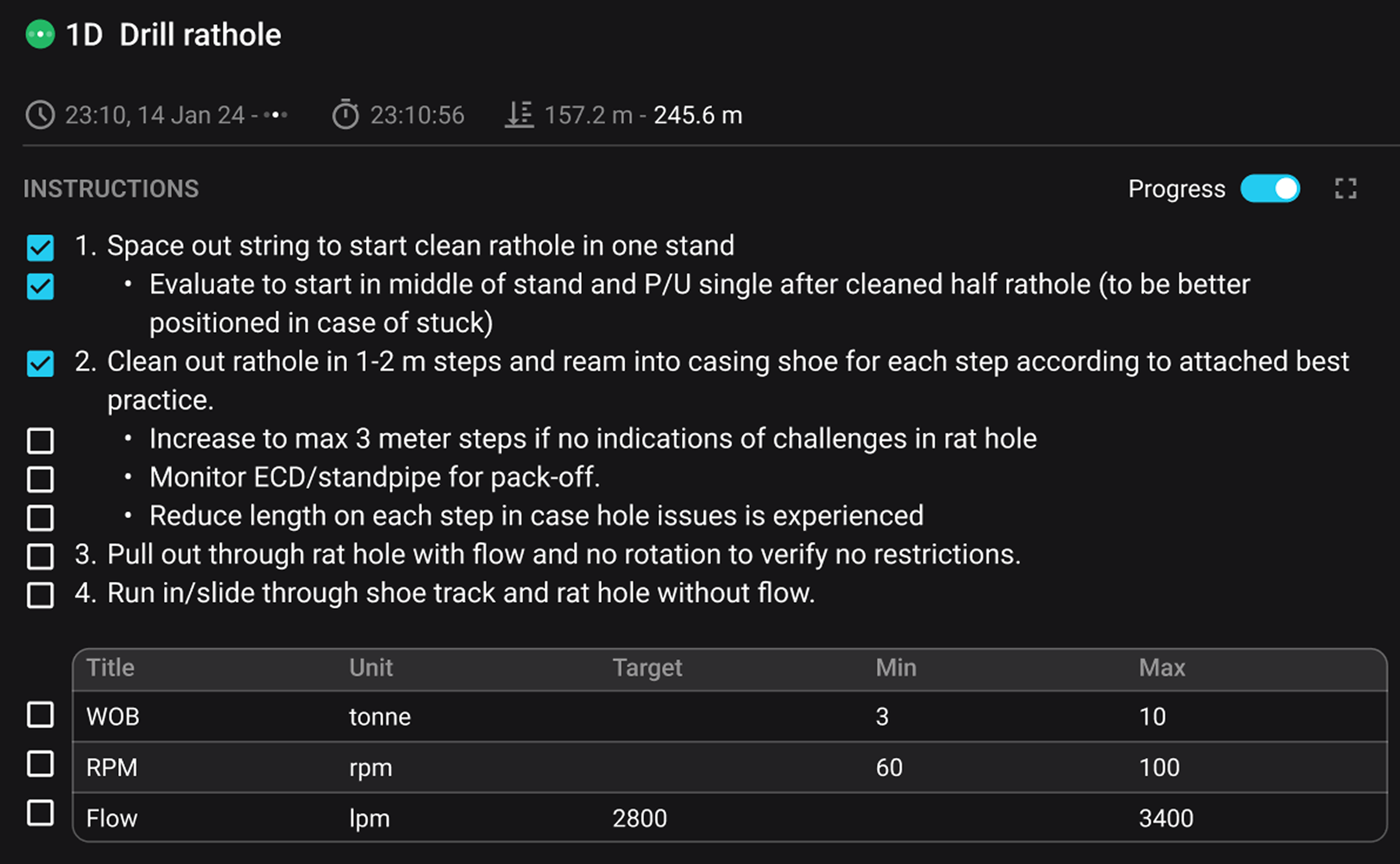
A Progress toggle feature has been introduced to active steps, allowing users with the Driller or Step Responsible role to enable checkboxes alongside each line in the instruction text and tables. This functionality supports progress tracking within step content. Checkboxes are shown to all users but can only be modified by authorized roles. Once a step is completed, the checkboxes are no longer visible. Checks are preserved across page refreshes and when the toggle is switched on and off again. The checks are only visible in the instructions; they are not transferred to the operation log or exports.
Read more about it on Operation.
Global Action Bar can now move to the right sidebar
Back by popular demand, you can now move the Global Action Bar from the content area to the right sidebar and vice versa, freeing up even more vertical space for viewing instructions.
Minor features
Time zone added to PDFs: Exported PDFs now include the rig time zone, making timestamps clearer and easier to interpret across locations.
Decimals for sensor values: It's now possible to select the number of decimals for each sensor value. See how to do it under the step-by-step instructions on Realtime data.
Improved Global Action Bar card labeling: Global Action Bar cards now display clear text labels for Primary, Parallel, and related contexts, improving readability.
Simplified RigFlow PDF downloads: Event and phase information has been removed from RigFlow PDF downloads to reduce noise and improve clarity.
ONLY APPLICABLE for RigBridge 4 - Comment column added to Operational parameters table: A new comment column is now available in the Operational parameters table, making it easier to review contextual notes directly alongside operational data.
Bug fixes & performance improvements
Attachments & Documents
PDF attachments missing from change log: Fixed an issue where attachments were not visible in the change log for PDF documents.
Attachments with special characters failing to open: Resolved issues opening attachments containing special characters in certain DOPs.
 - Attachment was missing in archived PDF's of completed procedures: Fixed an issue with uploaded attachments on procedure steps that were not included when downloading the completed procedure as a PDF from the archive.
Data Display & Reporting
Operational parameter order incorrect: Fixed the inconsistent ordering of operational parameters between RigFlow and RigBridge.
Report back unit not visible until value entered: Resolved an issue where the report-back unit was hidden until a value was entered.